
Home AI - AI Interior Design
HubXLifestyle
4.33.08K Reviews
- Version
- 1.9.3
- Installs
- 10.00M
- Age Rating
- Everyone
Screenshots
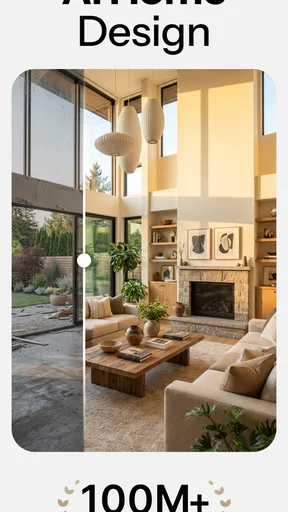

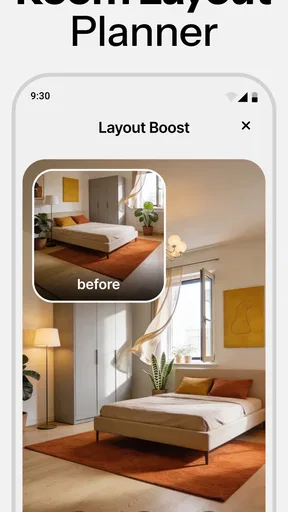
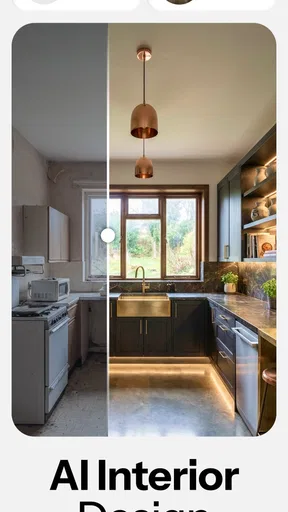
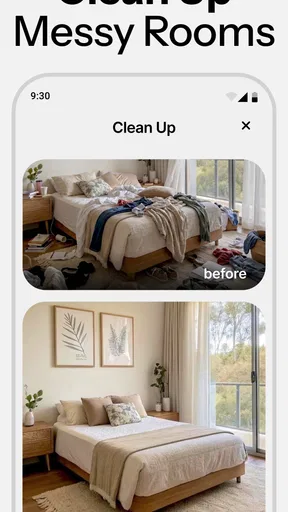
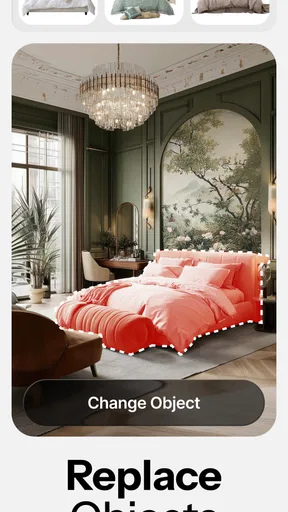
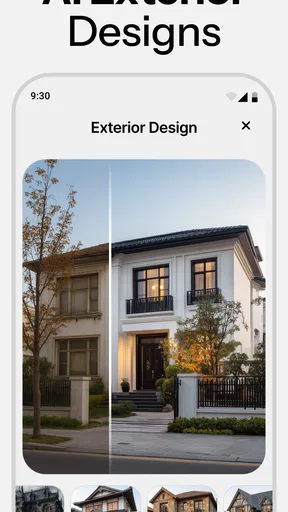
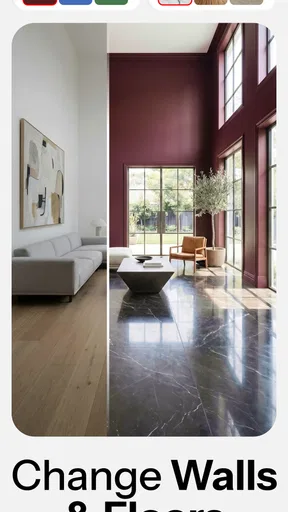
Our Review of Home AI - AI Interior Design
 Analysis by Appyee
I see Home AI as a quick way to explore possibilities for a room, not a replacement for careful planning or a professional designer. Its main appeal is the leap from a photo of a space to visual ideas you can react to. That can make decorating feel less abstract, especially when you know something needs to change but cannot yet picture what would work. I’d recommend it as an inspiration tool, with a little caution about treating generated layouts as a final plan.
That distinction matters in everyday use. An appealing room image can help you settle on a mood, but it cannot tell you whether a sofa will fit through your doorway or whether a proposed change suits your budget. I find the app most useful when I approach it with a specific question—such as whether a lighter look would suit a small living room—rather than expecting it to make every decision for me.
Turning a room photo into a starting point
Home AI - AI Interior Design is a lifestyle app from HubX, and its central idea is simple: use a room photo to kick off a redesign. The app is free to download, with in-app purchases ranging from $4.99 to $64.99 per item. It has a 4.4 average from around 967,000 ratings, and has been installed over 10 million times. Those figures suggest it has reached a large audience, though they don’t tell you whether its particular approach will suit your project.
When I first opened the Home AI - AI Interior Design app, I was greeted with a sleek and user-friendly interface. The design is intuitive, with everything clearly laid out, which means you don’t have to be a tech genius to navigate it. The app promises to use AI to help redesign your space, which got me excited. Who doesn’t want a bit of futuristic tech helping out with their home decor?
For a casual user, the photo-first approach is less intimidating than beginning with a blank floor plan or a complicated room-planning tool. You can start with the room as it is, then use the resulting ideas to identify colors, moods, or broad style directions worth exploring. In my view, that is the strongest reason to try it: it turns a vague “I want a change” into something concrete enough to discuss with a housemate or use as a reference while shopping.
Getting started with a useful photo
Setting up is a breeze. You start by snapping a photo of the room you want to redesign. The app then works its magic. Within moments, you’re presented with a range of design options tailored to your space. It’s like having dozens of interior design magazines rolled into one app.
The AI analyzes the dimensions, lighting, and color scheme of your room to suggest designs that make sense. It’s pretty impressive how it considers these factors to provide suggestions that are not just trendy but also practical.
For better comparisons, I’d take the photo from a position that shows as much of the room as possible, keeping the phone level and the main furniture visible. Then I’d use the same image while exploring different looks. Holding the viewpoint steady makes it easier to judge whether a style change is actually appealing, rather than confusing a new camera angle with a better design. A busy or tightly cropped photo can also make it harder to read the overall effect, so clearing small clutter first is a worthwhile step.
A realistic use is planning a living-room refresh before buying anything. You might be torn between a calmer neutral direction and a bolder look; seeing both against your own walls can help you decide which one feels closer to home. I would treat the images as mood boards, then measure the room and check real product dimensions separately. That extra step is especially important for walkways, doors, and furniture that needs to fit into a tight corner.
Style exploration, with a practical boundary
One of the coolest features is the ability to play around with different styles. Whether you’re into minimalist, bohemian, or industrial chic, the app provides a variety of options. You can even mix and match elements to create a unique look that reflects your personality.
Another handy tool is the virtual furniture placement. You can drag and drop furniture pieces into your room to see how they fit. It’s a fantastic way to experiment without the hassle of moving heavy furniture around. Plus, it saves you from the dreaded buyer’s remorse!
There is a useful trade-off here: visual experimentation can make it easier to compare moods, but a convincing image is not the same as a measured plan. I’d use the furniture placement to think through broad questions—whether a room looks crowded, whether a different arrangement feels more open, or what kind of piece might balance a corner. Before spending money, I’d verify the dimensions and practical details independently. The app is better at helping you imagine a direction than guaranteeing that a real object will fit exactly as shown.
Compared with the usual alternatives, Home AI sits between browsing decor inspiration and building a detailed floor plan. Mood boards and image feeds offer plenty to look at, but may not show ideas in the context of your own room. Traditional planners are more useful when exact measurements and placement are the priority, though they can take more effort to set up. This app’s photo-led approach is a convenient middle ground: use it when you want fast visual inspiration, and choose a measurement-focused planner when precision is the job.
Personalization and sharing ideas
What sets this app apart from others is the personalized suggestions. The AI learns from your choices and starts tailoring recommendations to suit your taste. It’s like a personal interior designer learning what you love and crafting spaces that feel just right.
Also, you can share your designs with friends and family for feedback. It’s a great way to get second opinions before making any big changes. Plus, it’s fun to show off your creative flair!
Sharing is most useful when you ask for feedback on a particular decision rather than asking someone to judge an entire room at once. I’d send two contrasting directions and ask which feels more comfortable or which better fits the way the room is used. That can reveal differences in taste early, before anyone starts painting or moving furniture. It is still worth remembering that a friend is reacting to a visual concept, not checking measurements, durability, or whether a proposed arrangement will work for daily routines.
Who will get the most from it?
I think this app suits renters who want to explore a room’s potential before making reversible changes, first-time decorators who need a visual starting point, and homeowners who are collecting ideas before a larger project. It is also handy when two people share a space and need something more concrete than “I like modern” or “I want it to feel warmer.” A generated room concept can give that conversation a useful starting point.
It is less suitable if you need a reliable technical drawing, exact product dimensions, or a complete renovation specification. Someone working with contractors should use properly measured plans and professional advice where needed. And if you already know exactly what you want and mainly need to check whether a particular sofa fits, a measurement-led planning tool is likely to be a better use of your time.
For a small, low-risk project, I’d keep the process simple: photograph the room, compare a few distinct styles, save the direction that feels right, and make a short list of details to verify in person. That might include paint samples, furniture measurements, storage needs, and how much clear floor space you want to preserve. The value is not in accepting every generated choice; it is in spotting one or two ideas you would not have considered on your own.
Price, access, and version details
The app is free, and its in-app purchases are priced from $4.99 to $64.99 per item. I’d begin with the free experience and decide whether the available options answer your actual question before paying for more. If you are only looking for a couple of ideas for one room, it may be hard to justify an upgrade; if you expect to explore many directions, compare how the purchase fits your budget and intended use first. The purchase range is broad enough that checking the in-app terms before confirming anything is sensible.
Home AI is rated for Everyone and requires Android 7.0 or later. Its current version is 1.6.8, and it was released on April 3, 2024. The app has around 2,800 written reviews, alongside its much larger rating total. For anyone browsing an app catalog, those details offer a quick sense of its availability and audience, while the best test remains whether the photo-based workflow helps with the particular room they want to rethink.
Where expectations can trip you up
The biggest limitation is also tied to the app’s appeal: a polished visual can feel more definitive than it really is. AI-generated design suggestions are a source of ideas, not a guarantee that every detail will translate neatly into a real home. Existing furniture, awkward corners, natural light at different times of day, and the way people actually move through a room all matter. I’d avoid making a costly decision from a single image, especially if the change is difficult to reverse.
There is also a difference between inspiration and control. If you want to specify every measurement, material, and item, a photo-based tool may feel too broad. And if you dislike AI-generated concepts or would rather choose each object yourself from real products, a conventional planner or a carefully assembled mood board may feel more dependable. I see Home AI as most successful when the goal is to explore, not to hand over the whole design process.
My verdict on the experience
After spending some time with Home AI - AI Interior Design, I can confidently say it's a game-changer for anyone looking to revamp their living space. Whether you’re a design newbie or a seasoned decorator, this app provides inspiration and practical tools that make the process enjoyable and stress-free.
So, if you’re ready to breathe new life into your home, give this app a whirl. It’s a fantastic blend of technology and creativity that brings out the interior designer in all of us. Happy decorating!
My recommendation is more specific: try it if you want a low-pressure way to see possible styles in the context of your own room. Keep your expectations grounded, compare ideas rather than treating one result as a blueprint, and confirm practical details before buying or renovating. For that kind of early-stage decision-making, Home AI can make a blank-page problem feel much easier to tackle. If accuracy, construction planning, or exact furniture fit is your main concern, pair it with a measured tool—or start with one instead.
Verdict
Strengths of Home AI - AI Interior Design
- User-friendly interface simplifies design tasks.
- Offers a wide range of style templates.
- Real-time visualization of design changes.
- Integrates seamlessly with smart home devices.
- Personalized recommendations based on preferences.
Limitations of Home AI - AI Interior Design
- Limited free features without subscription.
- Occasional lag on older devices.
- Requires stable internet connection.
- Some styles may lack customization options.
- Premium features can be costly.
Other Releases by HubX
View All
DaVinci - AI Image Generator
Art & Design3.6

AI Video - AI Video Generator
Photography4.5

MyTunes : AI Music Generator
Entertainment4.3

Chatbot - AI Smart Assistant
Productivity4.3
Similar Picks in This Category
View All
SmartThings
Samsung Electronics Co., Ltd.4.6

Google Home
Google LLC4.0

Pinterest4.2

Astrotalk - Talk to Astrologer
Astrology & Horoscope4.7

My Verizon
Verizon Consumer Group4.5

Samsung Wallet (Samsung Pay)
Samsung Electronics Co., Ltd.4.1
Frequently Asked Questions
What is Home AI - AI Interior Design and how does it work?
Home AI - AI Interior Design is an innovative app that uses artificial intelligence to help users design and visualize their home interiors. By simply uploading photos of your space, the app provides design recommendations tailored to your preference and lifestyle. It features a user-friendly interface and offers various design styles, from modern to classic.
Is Home AI - AI Interior Design easy to use for beginners?
Yes, Home AI is designed with simplicity in mind, making it accessible for users of all skill levels. The app offers an intuitive step-by-step guide to help you get started, even if you have no prior experience in interior design. Its AI-driven suggestions simplify the decision-making process, making it ideal for beginners.
Does Home AI - AI Interior Design support multiple design styles?
Absolutely. Home AI supports a wide range of design styles, including modern, minimalist, traditional, and more. Users can explore different styles and mix and match elements to create a personalized look. The AI engine suggests styles based on your preferences and the existing architecture of your space.
Can I use Home AI - AI Interior Design without an internet connection?
Home AI requires an internet connection to access its AI capabilities and design database. While some basic features may be available offline, a stable connection is necessary to fully utilize the app's advanced features and receive the most accurate design suggestions.
Are there any costs associated with using Home AI - AI Interior Design?
Home AI offers a free version with limited features, allowing users to try out basic functionalities. For access to advanced features, such as premium design templates and personalized consultations, users can opt for in-app purchases or a subscription plan. Prices vary depending on the chosen package.
